MarginNote

App Store 付款与退款说明

在 App Store 购买 MarginNote 时,钱付给了谁?需要退款时应该向谁申请?

你的交易对象
Apple
付款先全部进入 Apple,订单由 Apple 管理,收据也由 Apple 发出。
谁来审核退款
只有 Apple
退款由 Apple 独立审核,批准后从 Apple 支付系统原路退回。
1

退款流程:如何申请退款

退款申请只能由购买者本人向 Apple 提交,审核和退款都由 Apple 完成。
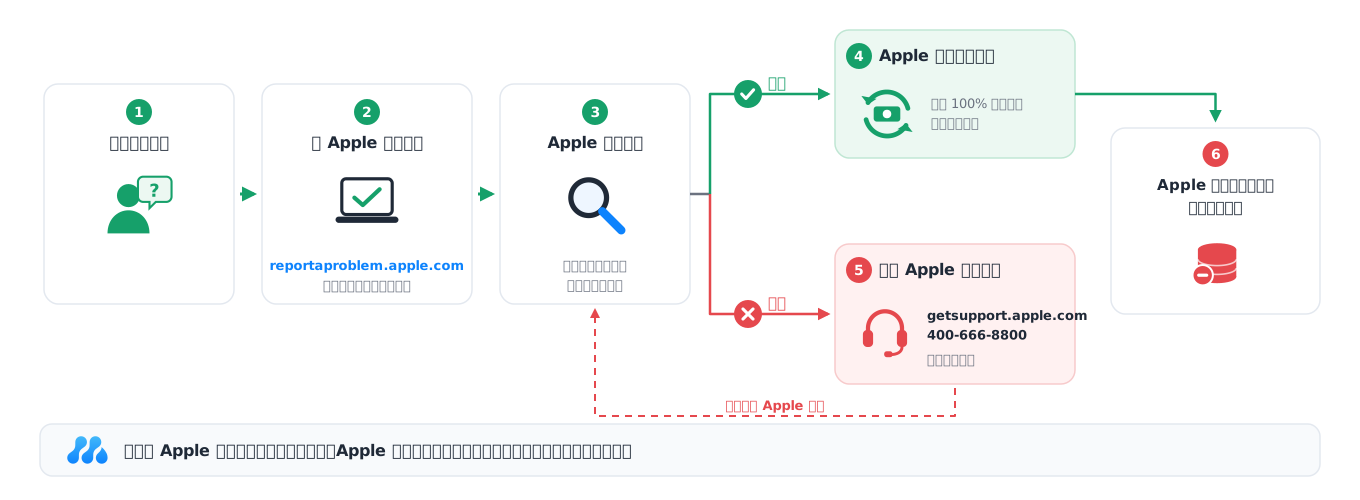
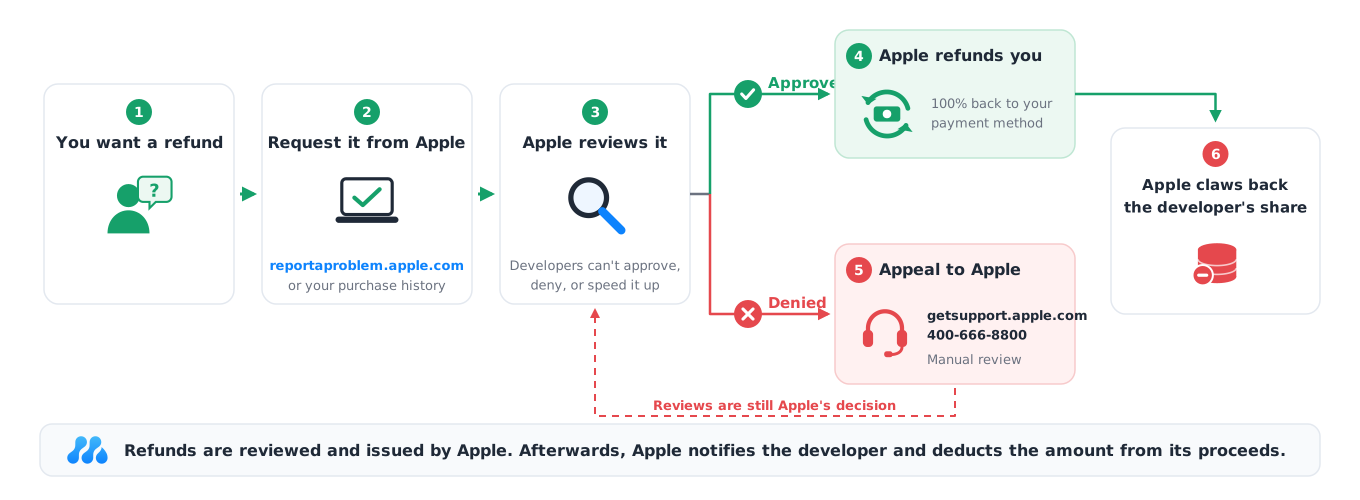
退款流程:用户向 Apple 申请,Apple 独立审核;批准则原路退款并从开发者结算中扣回,拒绝则可联系 Apple 客服申请复核
图 1 · App Store 退款流程

退款步骤

  1. 通过 Apple 官方渠道 reportaproblem.apple.com(或 App Store 中的账户购买记录)提交退款申请。操作步骤见 Apple 官方说明:针对从 Apple 购买的 App 或内容申请退款。
  2. Apple 独立审核你的申请,开发者无法参与这个过程。
  3. 如果 Apple 批准,你将获得 100% 退款,款项原路退回到你的付款方式。
  4. 如果 Apple 拒绝,你可以联系 Apple 客服申请人工复核(见常见问题)。
  5. 开发者只会在退款完成后收到通知,无法干预整个过程。

官方退款政策要点

退款时限 最重要

退款申请渠道

  • 用户必须直接向 Apple 申请退款,而非开发者
  • 退款申请通过 reportaproblem.apple.com 或 App Store 账户设置进行
  • 官方退款指南:如何申请 App Store 退款

退款审核

  • Apple 全权负责审核退款申请
  • 开发者无权参与退款决策过程
  • 退款审核标准由 Apple 制定并执行

退款金额

  • 一旦 Apple 批准退款,用户将获得 100% 退款
  • 款项原路退回到你原来的付款方式

退款限制

  • 频繁申请退款的用户可能面临限制
  • 已消费的内容(如已使用的消耗型项目)可能不予退款
  • Apple 有权拒绝滥用退款系统的用户的申请

取消订阅 ≠ 退款

  • 不再需要订阅时,在「设置」→ 你的姓名 →「订阅」中取消,避免下一周期扣款。
  • 取消订阅不会自动退回已扣除的费用,退款需要另外申请。
2

为何退款与开发者无关

在 App Store 购买时,你是和 Apple 进行交易,而不是和开发者。

打个比方:App Store 就像一家超市
你:顾客
用户
到超市挑选商品,在收银台付款,拿到的是超市的小票。
Apple:超市
App Store
负责上架、分发、销售、收银、开小票,也负责退货、退款等售后。
MarginNote:厂家
开发者
负责生产商品(开发软件、提供服务),把商品交给超市销售,再由超市定期结算货款。
在超市买的东西要退货,应该去超市的服务台,而不是去找厂家:厂家不在收银台,拿不到你付的钱,也看不到你的小票。App Store 的退款同样要向 Apple 申请。
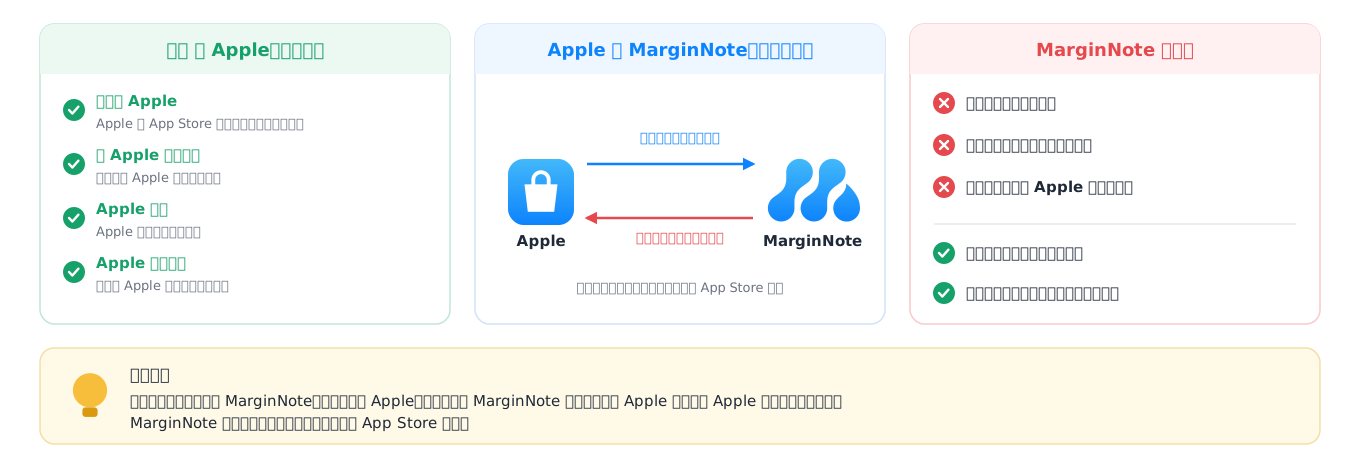
三方关系:用户与 Apple 是购买关系,Apple 与 MarginNote 是分发与结算关系
图 2 · 用户、Apple 与 MarginNote 的关系

法律和合同关系:三方合同关系

双方关系
用户 与 Apple
购买合同关系
你在 App Store 向 Apple 付款,购买、扣款和退款都在 Apple 的系统中完成。根据 App Store 条款,Apple 是内容的法定销售方,退款请求需要向销售方(Apple)提出。
开发者 与 Apple
分发合同关系
MarginNote 把软件发布到 App Store,由 Apple 负责销售、收款和订单管理,并按周期与开发者结算。
用户 与 开发者
无直接金融合同
两者之间不存在直接的金融合同关系。你向 Apple 付款,而不是直接向开发者付款;MarginNote 负责软件开发和服务,不参与 App Store 的收款。

参考:App Store 审核指南 · Apple 开发者计划许可协议 · Apple 媒体服务条款与条件

法律和合同关系:Apple 作为销售方
  • 根据 App Store 条款,Apple 是内容的法定销售方。
  • 用户向 Apple 付款,而非直接向开发者付款。
  • 退款请求必须向销售方(Apple)提出。
  • 参考 Apple 开发者计划许可协议。

开发者无法控制的方面

退款决策

  • 开发者无权批准或拒绝退款申请
  • 所有退款决定均由 Apple 单方面做出
  • 开发者无法查看或干预退款申请的处理过程
  • 开发者也不能取消订单,或更改 Apple 已经作出的审核结果

退款通知

  • 开发者通常只会在退款完成后收到通知
  • 开发者无法干预正在进行的退款流程
  • 通知仅包含基本信息,不含用户详细资料
说句心里话

在 App Store 这套体系里,开发者的话语权其实很小。MarginNote 只是 App Store 上众多开发者中的一个,规则由 Apple 统一制定,我们只能遵守。我们没有处理订单的后台,看不到是谁购买、是谁提交了退款申请;Apple 不会就某一笔退款征求开发者的意见,也不会告诉我们审核的理由。退款一旦通过,对应的收入会被直接扣回,即使这笔钱早已结算给我们,也会从之后的收入中扣除。

所以在批准退款这件事上,我们确实无能为力:能不能退、什么时候退,都由 Apple 决定。我们能做的,是把流程讲清楚,并在你向 Apple 申请或复核时,尽力为你提供说明。

MarginNote 可以为你做什么
  • 向你说明退款流程,提供 Apple 官方的申请与复核渠道。
  • 在适用的情况下出具支持退款的说明,供你向 Apple 申请或复核时参考。
  • 如果 Apple 需要核实订单或权益情况,通过官方渠道配合说明。
3

结论

希望以上信息能帮助你了解 App Store 的付款和退款机制,以及开发者在其中的实际角色和权限范围。如有更多疑问,可以参考 Apple 支持 或直接联系 Apple 客服。

?

常见问题

申请退款过程中经常遇到的情况。

退款申请被 Apple 拒绝了,怎么办?
  1. 前往 getsupport.apple.com,按页面步骤选择对应问题,可以选择「安排通话」,由 Apple 客服给你打电话。
  2. 也可以直接拨打 Apple 客服电话 400-666-8800,申请人工复核。请如实、详细地说明付款时间、扣款原因、实际使用情况和退款理由。
  3. 如果 MarginNote 客服已经回复支持你申请退款,可以保留该回复的截图,在 Apple 提供补充材料的渠道时一并提交,供 Apple 审核时参考。
  4. 复核结果仍由 Apple 决定。
Apple 客服让我「联系开发者」,怎么办?
申诉过程中,Apple 客服有时会这样建议。但就像上面说的,App Store 的订单和退款由 Apple 处理,开发者没有发起或办理退款的权限,所以仍需要继续联系 Apple 申请复核。
开发者为什么不能直接把钱退给我?
因为这笔钱从来没有直接到过开发者手里:你付款给了 Apple,开发者也看不到是哪个 Apple 账户购买的。退款必须由 Apple 在它的支付系统里原路退回,开发者没有这样的操作入口。
忘记关闭自动续费被扣款了,怎么办?
请在发现扣款后尽快向 Apple 申请退款,如实说明扣款时间、未及时取消的原因和续费后的实际使用情况。同时在「设置」→ 你的姓名 →「订阅」中取消 MarginNote 订阅,避免下一周期再次扣款。

参考资料: Apple 支持:申请退款 报告问题 联系 Apple Apple 媒体服务条款与条件 获得付款概述 App Store 审核指南 Apple 开发者协议
MarginNote

App Store Payments & Refunds

When you buy MarginNote on the App Store, who receives your money, and who handles a refund?

Who you buy from
Apple
Your full payment goes to Apple. Apple manages the order and issues the receipt.
Who reviews refunds
Only Apple
Apple reviews every request on its own and returns approved refunds through its payment system.
1

Refunds: how to request one

Only the purchaser can request a refund from Apple. Apple handles both the review and the refund.

Refund process: you request a refund from Apple, Apple reviews it, and either refunds you and claws back the developer's share, or denies it and you can appeal to Apple
Figure 1 · App Store refund process

Refund steps

  1. Submit a request through Apple at reportaproblem.apple.com (or from your purchase history in the App Store). See Apple's guide: Request a refund for apps or content that you bought from Apple.
  2. Apple reviews your request independently. The developer cannot take part.
  3. If Apple approves, you get a 100% refund to your original payment method.
  4. If Apple denies it, you can contact Apple Support and ask for a manual review (see the FAQ).
  5. The developer is only notified after the refund is complete and cannot intervene at any point.

Key points of Apple's refund policy

Time limit Key

Where to apply

  • Users must request refunds directly from Apple, not from the developer
  • Requests are made through reportaproblem.apple.com or App Store account settings
  • Official guide: How to request an App Store refund

Review

  • Apple is fully responsible for reviewing refund requests
  • Developers have no right to take part in the refund decision
  • Apple sets and enforces the review criteria

Refund amount

  • Once Apple approves a refund, the user gets a 100% refund
  • The money goes back to your original payment method

Limits

  • Users who request refunds frequently may face restrictions
  • Consumed content (such as used consumable items) may not be refunded
  • Apple may deny requests from users who abuse the refund system

Cancelling ≠ refund

  • To stop renewing, go to Settings → your name → Subscriptions and cancel.
  • Cancelling does not refund past charges. Request a refund separately.
2

Why refunds don't go through the developer

When you buy on the App Store, your transaction is with Apple, not with the developer.

Think of the App Store as a supermarket
You: the shopper
User
You pick a product, pay at the checkout, and get the supermarket's receipt.
Apple: the supermarket
App Store
Stocks the shelves, distributes, sells, takes payment, issues receipts, and handles returns and refunds.
MarginNote: the manufacturer
Developer
Makes the product (develops the software and provides the service), supplies it to the supermarket, and is paid by the supermarket periodically.
To return something bought at a supermarket, you go to the supermarket's service desk, not the manufacturer. The manufacturer isn't at the checkout, never received your money, and can't see your receipt. App Store refunds work the same way: you request them from Apple.
You buy from Apple; Apple distributes MarginNote and pays it out
Figure 2 · You, Apple and MarginNote

Legal and contractual relationship: three parties

PartiesRelationship
You & Apple
Purchase contract
You pay Apple on the App Store, and purchases, charges and refunds all happen in Apple's system. Under the App Store terms, Apple is the seller of the content, so refund requests go to the seller: Apple.
Developer & Apple
Distribution contract
MarginNote publishes its software on the App Store. Apple handles sales, payment and orders, and pays the developer periodically.
You & developer
No financial contract
There is no direct financial contract between you. You pay Apple, not the developer. MarginNote develops the software and provides the service, and is not involved in App Store payments.

References: App Store Review Guidelines · Apple Developer Program License Agreement · Apple Media Services Terms and Conditions

Legal and contractual relationship: Apple as the seller

What developers cannot control

Refund decisions

  • Developers cannot approve or deny refund requests
  • All refund decisions are made by Apple alone
  • Developers cannot see or intervene in how a request is handled
  • Developers also cannot cancel orders or change a decision Apple has made

Notifications

  • Developers are usually notified only after a refund is complete
  • Developers cannot intervene in a refund in progress
  • Notifications contain only basic information, no user details
A word from us

Within the App Store system, developers have very little say. MarginNote is one of many developers on the App Store; Apple sets the rules, and we follow them. We have no system for handling orders, and we can't see who made a purchase or who requested a refund. Apple doesn't consult developers about individual refunds or tell us why a decision was made. Once a refund is approved, the revenue is taken back, and if it has already been paid to us, it comes out of our later earnings.

So when it comes to approving a refund, there is genuinely nothing we can do: whether and when you get a refund is decided by Apple. What we can do is explain the process clearly and provide a supporting note when you apply to Apple or ask for a review.

What MarginNote can do for you
  • Explain the refund process and point you to Apple's official channels.
  • Where appropriate, provide a note supporting your refund to include in your request or appeal.
  • Help through official channels if Apple needs to verify an order or entitlement.
3

Summary

We hope this explains how App Store payments and refunds work, and what role developers actually play. For more help, visit Apple Support or contact Apple directly.

?

Frequently asked questions

Common situations when requesting a refund.

Apple denied my refund. What now?
  1. Go to getsupport.apple.com, choose your issue, and select "Schedule a call" to have Apple Support call you.
  2. Or call Apple Support (mainland China: 400-666-8800; elsewhere, your local Apple Support number) and ask for a manual review. Explain the purchase date, the charge, how you have used the app, and why you want a refund.
  3. If MarginNote has replied supporting your refund, keep a screenshot and submit it to Apple when there is a way to add supporting material.
  4. The outcome of the review is still Apple's decision.
Apple Support told me to "contact the developer". What should I do?
Apple Support sometimes says this during an appeal. But as explained above, App Store orders and refunds are handled by Apple, and developers have no way to issue a refund. You still need to ask Apple for a review.
Why can't the developer refund me directly?
Because your money never reached the developer directly. You paid Apple, and the developer can't see which Apple Account made the purchase. Refunds must be returned by Apple through its own payment system, and developers have no access to it.
I forgot to turn off auto-renewal and was charged. What now?
Request a refund from Apple as soon as you notice the charge, and explain when it happened, why you didn't cancel in time, and how much you've used the app since. Also cancel the subscription in Settings → your name → Subscriptions so you aren't charged again.

References: Apple Support: Request a refund Report a Problem Contact Apple Apple Media Services Terms and Conditions Overview of receiving payments App Store Review Guidelines Apple Developer Agreements